At Osaka Beauty Art College,
This year's interview exams will be conducted both in person and online.
If you wish to take the online interview test, please read these notes carefully before taking the test.
Notes on conducting online entrance examinations
1) The online entrance exam is available to those who can take the exam in a stable communication environment, a quiet environment, and who can use the Zoom app on a smartphone, tablet, PC, etc.
2) Please take the exam in uniform (or a suit).
3) When taking the online entrance exam, only the candidate will be allowed in the room.
We plan to use the examinees' cameras to survey the room in 360 degrees to see if there are any other people present.
4) Except for the online interview, admission procedures will be the same as for regular entrance exams.
Masu.
About installingZoom
ZOOM app for iPhone
https://itunes.apple.com/jp/app/zoom-cloud-meetings/id546505307?mt=8
ZOOM app for android
https://play.google.com/store/apps/details?id=us.zoom.videomeetings&hl=ja
*Please be sure to install Zoom in advance.
Precautions when connecting to the Internet
1) Please prepare a device that can access the Internet, such as a PC, tablet, or smartphone.
2) Please ensure you have an internet connection and take the exam after connecting. If your internet connection is charged based on data usage (pay-as-you-go), the fees may be high.
We recommend that you secure a flat-rate internet connection that allows constant connection, such as fiber optic lines.
For inquiries regarding the above, please contact:
連絡先TEL:大阪ビューティーアート専門学校 0120-79-5514
・・・・・・・・・・・・・・・・・・・・・・・・・・・・・・・・・・・・・・・・・・・・・・・・・・・
Online entrance exam procedure
Steps for taking the exam (entry)
① Install the Zoom app.
② Access the examination QR code that was sent to you by mail along with your admission ticket from our school and launch Zoom.
③ Please wait for a while until the following screen appears, then select "Join with video". You will then be taken to the waiting room, where you will need to wait until your interview time.
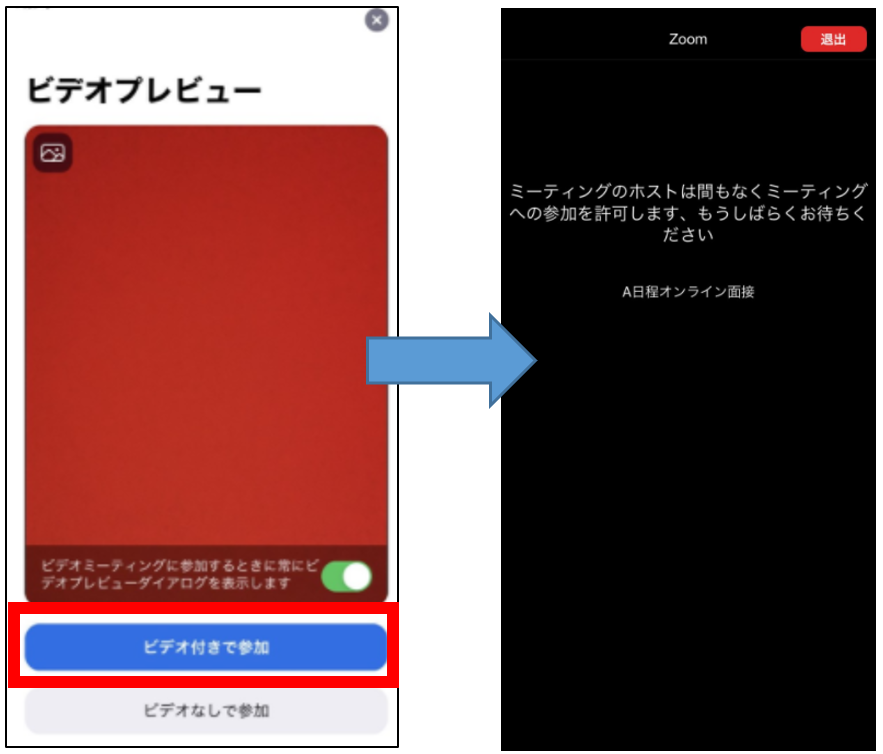
④ When it is time for your interview, you will be allowed to enter the room. After entering, please turn on your camera and microphone and follow the interviewer's instructions.
*The screen explanation will be based on the iPhone screen. For those using Android smartphones, tablets, and computers, the screens will be slightly different, but the operation methods will be similar.
*If you have any trouble connecting on the day, please be aware that many people will be taking the exam at the same time, so please contact us by phone and we may have to make phone enquiries overcrowded lines. Please contact us via our official LINE account with your name and the time the exam will start.